Smart Home Security in 2026: The Rising Threat Landscape Every Homeowner Must Know

Executive Summary
The average household now contains 14-22 connected devices, and smart home cyber attacks have surged to an alarming 29 attempts per household daily in 2026. With over 21-24 billion IoT devices deployed globally, cybercriminals have turned residential networks into high-value targets. This comprehensive analysis reveals the seven most dangerous vulnerabilities threatening your smart home right now — and the actionable steps you must take to protect your family's privacy, safety, and digital well-being.
The Smart Home Revolution's Dark Side
Smart homes promise convenience, efficiency, and peace of mind. Your thermostat learns your temperature preferences. Your security cameras protect your property. Your smart locks grant access to guests remotely. Your voice assistant controls everything with simple commands.
But beneath this seamless experience lies a disturbing reality: 38% of smart home devices have been compromised at least once, and the threats are accelerating faster than most homeowners realize.
2026 Smart Home Threat Statistics
The numbers paint a stark picture:
- 11 million smart cameras hijacked globally
- 27% of IoT baby monitors contain exploitable security flaws
- 22% of voice assistant devices vulnerable to spoofing attacks
- 16% of smart TVs infected with malware
- 31% of home IoT traffic transmitted without encryption
- 41% of devices still using weak or default passwords
These aren't abstract statistics. They represent real families whose privacy has been violated, whose homes have been surveilled, and whose personal data has been stolen.
The Seven Deadly Vulnerabilities in Your Smart Home
1. Weak or Default Passwords: The #1 Entry Point
The Threat:
Despite years of warnings, weak passwords remain the most exploited vulnerability in smart home security. Manufacturers ship devices with generic credentials like "admin/admin" or "1234" to simplify setup. Hackers maintain comprehensive databases of these default passwords, allowing them to breach devices in seconds.
Real-World Impact:
A family in Portland discovered their smart camera had been accessed by strangers who watched their daily routines for weeks before attempting a burglary. The camera used its default password, making the hack trivially easy.
The Statistics:
- 35% of consumer IoT devices ship with default credentials still enabled
- 41% of smart home users never change factory passwords
- Default password exploitation accounts for 62% of successful smart home breaches
Why It Persists:
Consumers prioritize convenience over security. Changing passwords across 15-20 devices feels overwhelming. Many users don't even realize their devices have passwords that can be changed.
The Fix:
- Change every default password immediately upon device setup
- Use unique, complex passwords for each device (minimum 16 characters)
- Deploy a password manager (1Password, Bitwarden) to track credentials
- Enable two-factor authentication wherever available
2. Unsecured Networks: The Highway for Hackers
The Threat:
Your Wi-Fi network is the foundation of your smart home ecosystem. If your network uses weak encryption (WEP or outdated WPA) or has a guessable password, attackers can intercept all traffic between your devices and the cloud.
The Attack Vector:
Hackers park outside homes with laptops, scanning for weak Wi-Fi signals. Once they crack your network password, they gain access to:
- Live camera feeds from security cameras
- Smart lock control (physical access to your home)
- Voice assistant command history
- Thermostat schedules (revealing when you're away)
- Personal devices (phones, laptops, tablets)
2026 Network Statistics:
- 71% of IoT devices connect via Wi-Fi (creating massive attack surfaces)
- 46% of employees connect personal IoT devices to work networks (introducing corporate risk)
- Home networks experience an average of 29 attack attempts daily
The Attack Timeline:
- 0-5 minutes: Hacker identifies target network with weak encryption
- 5-30 minutes: Password cracking begins (WPA2 can be cracked in 2-10 hours)
- 30 minutes-2 hours: Network access achieved
- 2-24 hours: Device reconnaissance and vulnerability mapping
- 24+ hours: Full device compromise and data exfiltration
The Fix:
- Upgrade to WPA3 encryption (or minimum WPA2 with strong password)
- Create a separate guest network exclusively for IoT devices
- Use a 16+ character network password with mixed characters
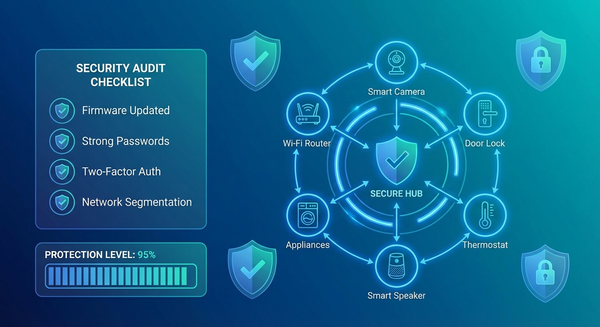
- Enable network segmentation to isolate smart devices from personal computers
- Consider a VPN router (like ExpressVPN Aircove) for whole-home protection
3. Outdated Firmware: The Invisible Time Bomb
The Threat:
IoT firmware is software that runs on your devices, controlling their functionality and security. When manufacturers discover vulnerabilities, they release firmware updates to patch them. But 33% of IoT devices globally run outdated firmware containing known, exploitable security flaws.
Why Firmware Matters:
Firmware vulnerabilities can allow attackers to:
- Gain full administrative control of devices
- Install malware or spyware
- Create backdoors for persistent access
- Brick devices (render them unusable)
- Pivot into your broader network
The Update Gap Problem:
Many smart home device manufacturers:
- Release updates infrequently (1-2 times per year)
- Stop supporting devices after 2-3 years
- Fail to notify users about critical security updates
- Make update processes confusing or hidden in menus
Real-World Consequences:
In 2025, a critical vulnerability in popular smart doorbell firmware allowed attackers to unlock doors remotely. The manufacturer released a patch, but 67% of affected devices remained unpatched six months later because users didn't know updates were available.
2026 Firmware Statistics:
- 33% of global IoT devices run outdated firmware
- 52% of users never manually check for firmware updates
- Only 28% of devices support automatic firmware updates
- Average time between vulnerability disclosure and user patching: 8.3 months
The Fix:
- Enable automatic firmware updates if available
- Set monthly calendar reminders to manually check for updates
- Subscribe to manufacturer security bulletins for your devices
- Replace devices from manufacturers who no longer provide updates
- Use smart home hubs (like Samsung SmartThings) that centralize update management
4. Lack of Encryption: Broadcasting Your Life in Plain Text
The Threat:
Encryption scrambles data so only authorized parties can read it. Without encryption, your IoT devices broadcast sensitive information in plain text that anyone on the network can intercept and read.
What's At Risk:
Unencrypted IoT traffic can expose:
- Live video feeds from security cameras
- Audio recordings from voice assistants
- Smart lock access codes
- Thermostat schedules revealing your routine
- Personal health data from wearables
- Payment information from smart appliances
The Shocking Reality:
- 29% of IoT devices use weak or no encryption
- 31% of smart home traffic is transmitted unencrypted
- 21% of device-cloud communication lacks TLS enforcement
Camera Privacy Nightmare:
Smart cameras without encryption are particularly dangerous. Hackers have created entire websites showcasing thousands of unsecured camera feeds from homes, baby nurseries, and bedrooms. Victims have no idea they're being watched.
The Fix:
- Only purchase devices that explicitly advertise end-to-end encryption
- Verify devices use TLS 1.2 or higher for cloud communication
- Check manufacturer security documentation before buying
- Avoid cheap, no-name IoT brands that skimp on security
- Use encrypted VPN connections for remote device access
5. Malware and Botnets: Your Devices as Cyber Weapons
The Threat:
IoT malware has exploded in sophistication and scale. Cybercriminals infect vulnerable smart home devices to recruit them into massive botnets — armies of compromised devices used to launch devastating cyber attacks.
The Botnet Threat:
- 32-40 million devices currently infected globally
- 39% of smart cameras serve as leading infection vector
- 28% of routers compromised due to outdated firmware
- Largest botnet attack reached 1.7 Tbps (capable of taking down entire countries' internet infrastructure)
How Your Devices Get Infected:
- Automated scanning: Malware automatically scans millions of IP addresses looking for vulnerable devices
- Exploit deployment: Upon finding a vulnerability, malware installs itself
- Command and control: Infected devices connect to attacker's server
- Weaponization: Devices await commands to launch DDoS attacks, mine cryptocurrency, or spread to other devices
IoT Malware Capabilities (2026):
Modern IoT malware can:
- Mine cryptocurrency using your electricity and device resources
- Harvest credentials from all devices on your network
- Launch brute-force attacks against other targets
- Hijack your router to intercept all traffic
- Create VPN tunnels for anonymous criminal activity
- Take full device control without your knowledge
- Execute man-in-the-middle attacks to steal sensitive data
- Self-update like legitimate software
Warning Signs Your Devices Are Infected:
- Unexplained slowdowns or performance issues
- Devices rebooting randomly
- Unusual network traffic spikes
- Devices heating up excessively
- Strange behavior (lights turning on/off randomly)
- Increased electricity bills
- Unknown devices appearing on your network
The Fix:
- Install network-level antivirus (like Norton Core or Bitdefender Box)
- Use intrusion detection systems (IDS) to monitor abnormal traffic
- Enable router logging to track device behavior
- Perform monthly network scans to identify compromised devices
- Factory reset and update any suspicious devices immediately
- Consider AI-powered security platforms that detect botnet recruitment
6. Voice Assistant Exploitation: When Your Helper Becomes Your Enemy
The Threat:
Voice assistants (Amazon Alexa, Google Home, Apple HomePod) have become the central nervous system of smart homes. They control lights, locks, thermostats, cameras, and can make purchases, send messages, and access sensitive information. This makes them high-value targets for sophisticated attacks.
Attack Methods (2026):
1. Ultrasonic Command Injection
Attackers use inaudible ultrasonic frequencies to send commands to voice assistants without you hearing them. A malicious actor could:
- Unlock your smart locks while you sleep
- Disable security cameras
- Make unauthorized purchases
- Access your email or messages
2. Voice Command Replay Attacks
Hackers record legitimate voice commands and replay them later to execute unauthorized actions.
3. AI Voice Cloning
Using AI-powered voice synthesis, attackers can clone your voice from short audio samples (YouTube videos, voicemails, social media) and issue commands that your assistant believes come from you.
2026 Voice Assistant Statistics:
- 22% of voice assistants vulnerable to spoofing attacks
- 17 seconds of audio sufficient for AI voice cloning
- 89% of voice assistant users never review command history
- 43% of voice purchases lack additional authentication
Privacy Concerns:
Voice assistants are always listening for wake words. This means:
- Conversations are constantly being monitored
- Accidental activations record private moments
- Voice data is often stored in cloud servers
- Third-party skills/apps may access your voice data
- Law enforcement can subpoena voice recordings
The Fix:
- Enable voice recognition training (assistant learns only authorized voices)
- Require PIN codes for sensitive commands (purchases, smart lock control)
- Mute microphones when discussing sensitive information
- Regularly review command history in device apps
- Disable purchasing or set low spending limits
- Use physical mute buttons when not actively using the device
- Place voice assistants away from windows and doors (prevents external command injection)
7. Smart Lock Vulnerabilities: Digital Keys to Your Castle
The Threat:
Smart locks promise keyless convenience, but they've introduced new attack vectors that traditional locks don't face. When compromised, they grant physical access to your home, making them the most critical security device in your smart home.
Attack Vectors:
1. Mobile App Vulnerabilities
24% of IoT companion apps have SSL/TLS issues, allowing attackers to:
- Intercept unlock commands
- Steal authentication tokens
- Gain permanent remote access
2. Bluetooth Proximity Exploits
Some smart locks use Bluetooth proximity unlocking. Attackers use relay attacks to extend Bluetooth range, unlocking doors from hundreds of feet away.
3. Cloud Platform Breaches
If the manufacturer's cloud platform is breached, attackers gain access to all connected smart locks.
4. Default PIN Codes
Many smart locks ship with default PIN codes (0000, 1234) that users never change.
Notable Smart Lock Breaches:
- August Smart Lock (2023): API vulnerability allowed unauthorized lock control
- Wyze Lock (2024): Cloud breach exposed 2.4 million user accounts
- Kwikset Kevo (2025): Bluetooth relay attacks enabled remote unlocking
The Fix:
- Choose locks with end-to-end encryption and two-factor authentication
- Enable auto-lock features (door locks after X seconds/minutes)
- Disable geofencing auto-unlock (too easily exploited)
- Use unique, complex PIN codes (8+ digits)
- Regularly audit who has access to your locks
- Enable lock attempt notifications (alerts when someone tries to unlock)
- Install locks with built-in alarms (sound if forced entry detected)
- Choose brands with strong security track records (Yale, Schlage, August)
The AI-Powered Threat Multiplier
Artificial intelligence has become the force multiplier in IoT attacks. Cybercriminals now deploy AI tools that dramatically increase their efficiency and scale.
AI-Driven Attack Statistics (2026):
- 54% increase in AI-driven IoT exploit attempts
- 43% surge in AI-powered botnets (self-learning malware)
- 39% rise in AI-based API enumeration attacks
- 61% jump in AI-assisted password cracking
- 49% of reconnaissance scans now use AI
AI Attack Capabilities:
1. Adaptive Scanning
AI identifies device types and vulnerabilities faster than human hackers, scanning millions of devices per hour.
2. Automated Exploit Chains
Malware uses machine learning to decide which exploit to deploy based on real-time device behavior.
3. Intelligent Lateral Movement
AI predicts the highest-value targets inside networks, optimizing attack paths.
4. Polymorphic Payloads
Malware constantly modifies its signatures to evade traditional detection systems.
5. Coordinated Multi-Device Attacks
Botnets synchronize attacks across thousands of devices simultaneously with split-second precision.
The Implications:
Traditional security approaches (signature-based antivirus, manual monitoring) are increasingly ineffective against AI-powered threats. Defenders must adopt AI-based security solutions to keep pace.
The Privacy Crisis: What Your Smart Home Knows About You
Beyond security threats lies a profound privacy crisis. IoT devices collect unprecedented amounts of personal data, often without users fully understanding the scope.
Data Collection Reality (2026):
- 62% of IoT devices collect personally identifiable information (PII)
- 57% of smart home devices transmit behavioral data to the cloud
- 71% of wearables collect sensitive health data
- 38% of devices share data with third-party advertisers/analytics
- 49% of users unaware their devices share data externally
What Smart Devices Track:
Smart Cameras:
- Your daily routines and movement patterns
- Who visits your home and when
- Private conversations and activities
- Facial recognition data
Voice Assistants:
- Every conversation in earshot
- Shopping habits and preferences
- Music tastes and media consumption
- Personal schedule and reminders
Smart Thermostats:
- When you're home vs. away
- Sleep schedules
- Room usage patterns
- Energy consumption habits
Smart TVs:
- Everything you watch
- Viewing duration and patterns
- Conversations in the room (via microphones)
- Facial recognition data
Wearables:
- Heart rate and blood pressure
- Sleep patterns
- Physical activity levels
- Location history
- Medication schedules
The Dark Data Economy:
This data fuels a massive surveillance capitalism industry:
- Data brokers purchase smart home data to build detailed consumer profiles
- Advertisers target you based on behavior patterns observed through your devices
- Insurance companies potentially use health data to adjust premiums
- Employers could access data revealing lifestyle choices
- Governments can subpoena data for investigations
Geographic Tracking:
GPS-enabled IoT devices create detailed maps of your life:
- Home address
- Work location
- Daily commute routes
- Vacation destinations
- Frequently visited places
This data cannot be "reset" like a password. Once leaked or sold, it's permanent.
Building a Fortress: Comprehensive Smart Home Security Strategy
Protecting your smart home requires a layered defense strategy. No single solution is sufficient.
Layer 1: Network Foundation
Action Items:
- Upgrade to WPA3 encryption (or strong WPA2 as minimum)
- Create three separate networks:
- Primary network (computers, phones, tablets)
- IoT network (all smart home devices)
- Guest network (visitors)
- Use a 20+ character Wi-Fi password with mixed characters
- Enable network-level VPN (ExpressVPN Aircove, NordVPN router)
- Disable WPS (Wi-Fi Protected Setup - known vulnerability)
- Hide SSID (makes network invisible to casual scanning)
- Enable MAC address filtering (only known devices can connect)
Layer 2: Device Security
Action Items:
- Change all default passwords immediately
- Enable automatic firmware updates whenever possible
- Set monthly reminders to check for manual updates
- Enable two-factor authentication on every device that offers it
- Disable unused features (Bluetooth, remote access, microphones)
- Review privacy settings and minimize data sharing
- Register products with manufacturers to receive security notifications
Layer 3: Access Control
Action Items:
- Use a password manager (1Password, Bitwarden) for unique device credentials
- Enable voice recognition on voice assistants
- Require PINs for sensitive commands (smart locks, purchases)
- Set up user profiles with appropriate permission levels
- Audit access regularly (remove ex-guests, old temporary codes)
- Use time-limited access for service providers or guests
Layer 4: Monitoring & Detection
Action Items:
- Install network-level security (Norton Core, Bitdefender Box, Firewalla)
- Enable device activity logging in all apps
- Set up intrusion detection alerts on your router
- Review device logs monthly for suspicious activity
- Monitor network traffic for unusual data transfers
- Use AI-based anomaly detection to identify compromised devices
Layer 5: Physical Security
Action Items:
- Position cameras to avoid capturing sensitive areas (bedrooms, bathrooms)
- Use physical camera covers when privacy needed
- Place voice assistants away from windows/doors
- Use physical mute buttons on microphones when discussing sensitive topics
- Secure routers in locked locations (prevent physical tampering)
Layer 6: Vendor Selection
Action Items:
- Research security reputation before purchasing
- Choose brands with strong security track records:
- Google Nest
- Amazon (Ring, Echo)
- Apple HomeKit devices
- Samsung SmartThings
- Yale, Schlage (smart locks)
- Arlo, Ring (cameras)
- Avoid cheap, no-name brands that skip security features
- Verify encryption standards before buying
- Check update frequency (manufacturers should patch regularly)
Layer 7: Family Education
Action Items:
- Hold monthly family security meetings
- Create a "safe device use" policy for household members
- Teach children about online privacy and security
- Practice security drills (what to do if breach suspected)
- Share password manager credentials securely
- Assign device ownership responsibilities
The Future: What's Coming in 2027 and Beyond
The smart home security landscape will continue evolving rapidly. Here's what experts predict:
Emerging Threats:
1. Quantum Computing Attacks
Quantum computers will break current encryption standards, requiring new quantum-resistant cryptography for IoT devices.
2. Supply Chain Attacks
Hackers will increasingly target manufacturers during production, embedding malware in firmware before devices ship.
3. 5G-Powered Botnets
5G connectivity will enable faster, more powerful botnets capable of unprecedented attack scale.
4. Autonomous Attack Swarms
AI-powered malware will coordinate attacks across millions of devices without human involvement.
5. Deepfake Voice Attacks
AI voice cloning will become so sophisticated that voice authentication becomes unreliable.
Defensive Innovations:
1. Hardware Security Modules
More devices will include dedicated security chips (TPM, TEE) for hardware-level protection.
2. Blockchain-Based Device Identity
Blockchain technology will provide immutable device identity verification.
3. AI-Powered Defense
Machine learning security platforms will predict and prevent attacks before they occur.
4. Government Regulations
Mandatory security labeling and minimum security standards will become law globally.
5. Zero Trust Architecture
Every device connection will require continuous authentication and verification.
Compliance and Legal Implications
Smart home security isn't just about protection — it's increasingly a legal obligation.
Emerging Regulations (2026):
1. IoT Security Labeling Laws
Multiple regions now require security labels on IoT products indicating:
- Encryption strength
- Update policy duration
- Vulnerability disclosure programs
- Privacy protections
2. Mandatory Unique Passwords
New laws prohibit shipping devices with default passwords.
3. Update Support Requirements
Manufacturers must provide security updates for minimum 5 years.
4. Data Protection Compliance
Smart home data collection must comply with:
- GDPR (Europe)
- CPRA (California)
- Similar laws in 47+ countries
Liability Concerns:
For Homeowners:
If your compromised smart home devices are used in cyber attacks, you may face:
- Civil liability for damages
- ISP termination of service
- Potential criminal charges (if gross negligence proven)
For Manufacturers:
Companies face massive penalties for security failures:
- Up to $50 million in GDPR fines
- Class-action lawsuits from affected users
- Forced product recalls
- Regulatory sanctions
Conclusion: Take Action Today
Smart homes offer incredible convenience, but they've also created massive security vulnerabilities that cybercriminals actively exploit. With 38% of smart home devices already compromised and attacks increasing daily, inaction is not an option.
Your Next Steps (Complete Within 48 Hours):
Hour 1-2: Network Security
- [ ] Upgrade to WPA3 encryption
- [ ] Change Wi-Fi password (20+ characters)
- [ ] Create separate IoT network
- [ ] Enable router firewall
Hour 3-5: Device Audit
- [ ] List every connected device
- [ ] Change all default passwords
- [ ] Enable two-factor authentication
- [ ] Check for firmware updates
Hour 6-8: Enhanced Protection
- [ ] Install network-level security (Norton Core/Bitdefender Box)
- [ ] Set up device activity monitoring
- [ ] Enable automatic updates
- [ ] Disable unused features
Hour 9-10: Family Education
- [ ] Hold family security meeting
- [ ] Create device use policy
- [ ] Share security best practices
- [ ] Assign responsibilities
Ongoing (Monthly):
- [ ] Review device logs
- [ ] Check for firmware updates
- [ ] Audit user access
- [ ] Assess new threats
The Bottom Line:
Smart home security isn't a "set and forget" task — it's an ongoing commitment to protecting your family's privacy, safety, and digital well-being. The threats are real, growing, and sophisticated. But with proper precautions, you can enjoy the benefits of a connected home without becoming another statistic in the growing list of smart home breach victims.
Don't wait for a breach to take action. Secure your smart home today.
Additional Resources
Recommended Security Tools:
- Password Managers: 1Password, Bitwarden
- Network Security: Norton Core, Bitdefender Box, Firewalla
- VPN Routers: ExpressVPN Aircove, GL.iNet
- Security Platforms: Samsung SmartThings, Apple HomeKit
Educational Resources:
- NIST IoT Cybersecurity Guidelines
- OWASP IoT Security Project
- Consumer Reports Smart Home Security Guide
- EFF (Electronic Frontier Foundation) IoT Resources
Stay Informed:
- Subscribe to manufacturer security bulletins
- Join smart home security communities
- Attend local cybersecurity workshops
Disclaimer: This article provides general security guidance. Specific device security varies by manufacturer and model. Always consult manufacturer documentation and security experts for device-specific advice.