Smart Home Security Audit Checklist 2026: A Practical Guide for Homeowners

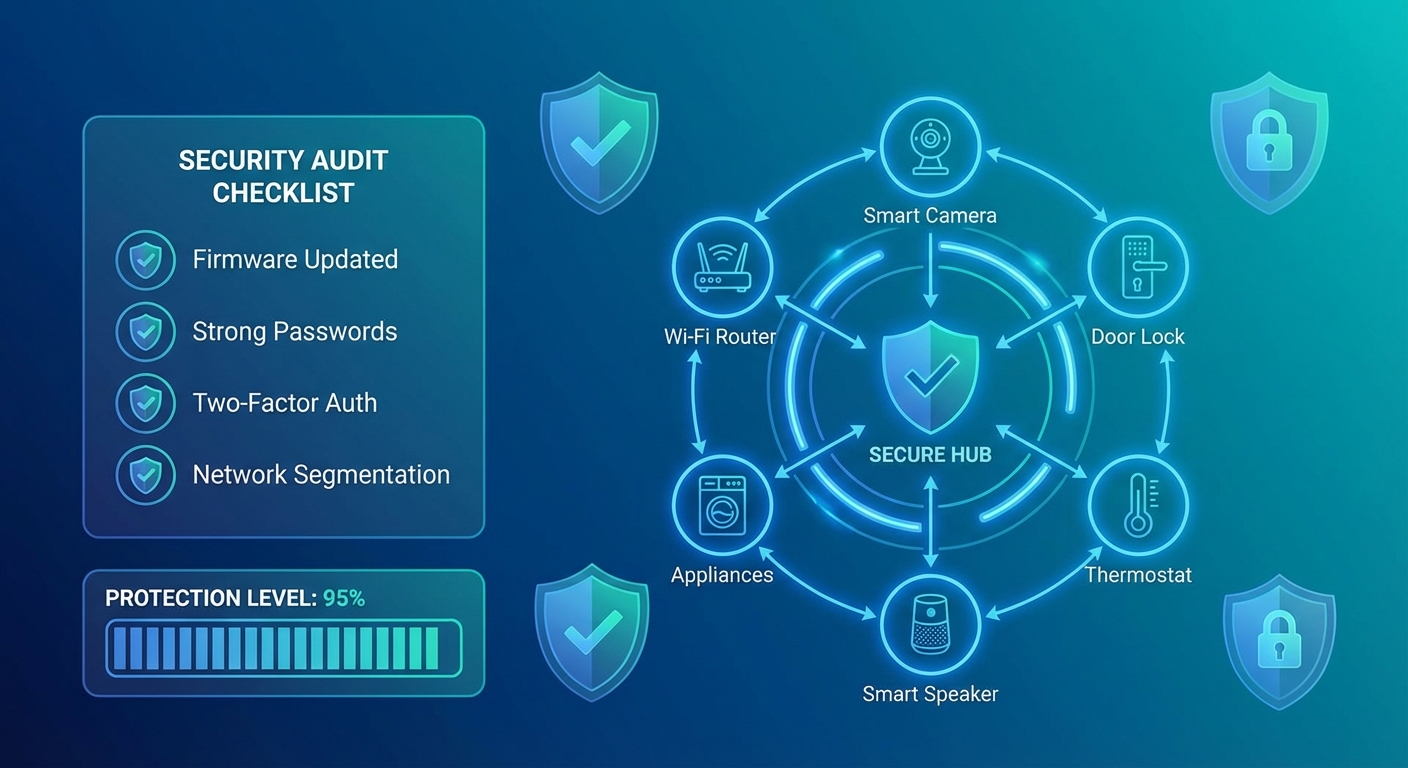
Your smart home is only as secure as its weakest connected device. With the average household now containing 22 IoT devices—from smart doorbells to connected refrigerators—the attack surface for cybercriminals has never been larger. This comprehensive security audit checklist will help you identify vulnerabilities and harden your smart home against emerging threats in 2026.
Why Smart Home Security Audits Matter Now
Recent data shows that 67% of smart home devices ship with at least one critical vulnerability, and many homeowners never change default credentials or update firmware. The consequences range from privacy invasion and data theft to devices being recruited into massive botnets for DDoS attacks. A single compromised smart camera or voice assistant can expose your entire home network.
Phase 1: Network Foundation Assessment
1.1 Router Security Baseline
Your router is the gateway to everything. Start here:
Immediate Actions:
- Change the default admin password to a unique 16+ character passphrase
- Update router firmware to the latest version (check manufacturer's site)
- Disable WPS (WiFi Protected Setup)—it's notoriously vulnerable
- Enable WPA3 encryption if your router supports it (fallback to WPA2 if needed)
- Change the default SSID to something that doesn't reveal your router model
Advanced Configuration:
- Disable remote management unless absolutely necessary
- Turn off UPnP (Universal Plug and Play) to prevent devices from opening ports automatically
- Enable router logging and review monthly for suspicious activity
- Consider enabling DNS-over-HTTPS (DoH) or DNS-over-TLS (DoT) for privacy
1.2 Network Segmentation
Don't let your smart lightbulb share the same network as your laptop with tax documents.
Create Three Separate Networks:
- Primary Network: Computers, phones, tablets with sensitive data
- IoT Network: Smart home devices, cameras, voice assistants
- Guest Network: Visitors and untrusted devices
Most modern routers support multiple SSIDs. If yours doesn't, consider a VLAN-capable router or mesh system. This isolation means a compromised smart bulb can't access your financial records.
1.3 DNS Security
Your Domain Name System queries reveal every website and service you access.
Recommended Actions:
- Switch to security-focused DNS providers (Cloudflare 1.1.1.1, Quad9, or NextDNS)
- Enable DNS filtering to block known malicious domains
- Consider Pi-hole for network-wide ad and tracker blocking
- Verify DNSSEC is enabled on your router
Phase 2: Device Inventory and Classification
2.1 Complete Device Discovery
You can't secure what you don't know exists.
Discovery Methods:
- Check your router's connected device list
- Use network scanning tools (Fing, Angry IP Scanner, or nmap)
- Review app-connected devices in each manufacturer's mobile app
- Check your email for device setup confirmations
Document Each Device:
- Device name and type
- Manufacturer and model number
- IP/MAC address
- Firmware version
- Last update date
- Associated accounts/credentials
2.2 Risk Classification
Assign each device a risk level:
Critical Risk (direct security/privacy impact):
- Smart locks and security systems
- Video doorbells and cameras
- Voice assistants (they're always listening)
- Medical devices
- Smart garage door openers
Medium Risk (personal data collection):
- Smart TVs and streaming devices
- Robot vacuums (they map your home)
- Smart thermostats
- Connected appliances
Low Risk (limited functionality):
- Smart bulbs and switches
- Decorative devices
- Plant sensors
Prioritize security hardening based on this classification.
Phase 3: Device-Level Security Hardening
3.1 Credential Hygiene
For Every Single Device:
- Change default usernames and passwords immediately
- Use unique passwords for each device (password manager essential)
- Enable two-factor authentication wherever offered
- Document credentials securely (encrypted password manager only)
Common Default Credentials to Change:
- admin/admin
- admin/password
- root/root
- 1234/1234
Attackers have databases of millions of default credentials. Don't be low-hanging fruit.
3.2 Firmware Updates
Outdated firmware is the #1 vulnerability in smart homes.
Establish Update Routine:
- Enable automatic updates if the option exists and is from a trusted manufacturer
- Monthly manual check for devices without auto-update
- Subscribe to manufacturer security bulletins
- Replace devices that no longer receive updates (typically 3-5 years old)
Critical Update Priority:
- Security cameras and video doorbells
- Smart locks and access control
- Routers and network equipment
- Voice assistants and hubs
- Everything else
3.3 Privacy Settings Optimization
Smart devices collect tremendous amounts of data.
For Each Device:
- Review privacy policy (especially data sharing practices)
- Disable telemetry and analytics collection where possible
- Turn off voice recording storage (Amazon Alexa, Google Home)
- Disable video cloud storage unless actively needed
- Opt out of marketing communications and data selling
- Disable features you don't use (reduces attack surface)
3.4 Unnecessary Features and Services
Every enabled feature is a potential vulnerability.
Disable if Not Needed:
- Remote access and cloud connectivity
- Voice purchasing and ordering
- Third-party skills and integrations
- Microphone/camera when not in use (physical covers for cameras)
- Bluetooth and NFC
- Location tracking
Phase 4: Access Control and Monitoring
4.1 Account Security
Manufacturer Account Hardening:
- Use unique, strong passwords for each manufacturer account (Ring, Nest, Philips Hue, etc.)
- Enable 2FA on every account that offers it
- Review linked third-party services and revoke unnecessary access
- Check "authorized devices" and remove unfamiliar ones
- Review account activity logs monthly
4.2 Physical Security Considerations
Often Overlooked:
- Smart devices with physical reset buttons can be hijacked if accessible
- USB ports on cameras and hubs can be exploit vectors
- Position cameras to minimize visibility of security codes/keypads
- Secure devices against physical tampering (especially outdoor cameras)
- Consider cable locks for high-value devices
4.3 Network Monitoring
You need visibility into what your devices are doing.
Monitoring Tools and Techniques:
- Enable router traffic logging
- Use network monitoring software (Wireshark, ntopng, or commercial solutions)
- Set up alerts for unusual data volumes or connection patterns
- Monitor for devices "calling home" to unexpected IP addresses
- Check for unusual bandwidth consumption
Red Flags:
- Devices communicating on unexpected ports
- Connections to unknown foreign IP addresses
- Traffic spikes during inactive periods
- New devices appearing on network
- Failed authentication attempts
Phase 5: Smart Home-Specific Vulnerabilities
5.1 Voice Assistant Security
Amazon Alexa, Google Home, and Apple HomePod require special attention.
Hardening Steps:
- Disable purchase capabilities or require voice PIN
- Review and delete voice history regularly
- Turn off "drop-in" features unless actively used
- Disable advertising personalization
- Review all connected skills/actions and remove unused ones
- Consider muting when discussing sensitive topics
5.2 Smart Camera Best Practices
Cameras are prime targets for hackers and voyeurs.
Essential Security:
- Use end-to-end encryption if available
- Enable motion detection recording only (not continuous)
- Position cameras to avoid bedrooms and bathrooms
- Use local storage instead of cloud when possible
- Enable privacy zones to mask sensitive areas
- Check camera LED indicators work (confirms when recording)
- Review sharing permissions quarterly
5.3 Smart Lock Precautions
Your smart lock is a physical security device—treat it accordingly.
Security Checklist:
- Keep traditional key access as backup
- Use auto-lock features with 30-second delay
- Enable tamper alerts
- Regularly audit access codes and remote users
- Require unique codes per user (not shared codes)
- Monitor access logs weekly
- Ensure battery backup and low-battery alerts work
Phase 6: Incident Response Preparation
6.1 Create a Response Plan
Document These Procedures:
- How to isolate compromised devices (network access)
- Emergency contact list (manufacturer support, ISP, local law enforcement)
- Data backup locations and recovery procedures
- Factory reset instructions for each critical device
- How to report incidents to appropriate authorities
6.2 Data Backup Strategy
What to Backup:
- Device configurations and settings
- Automation routines and scenes
- Access logs (before they're deleted)
- Network diagrams and device inventory
- Account recovery codes and credentials (encrypted)
Backup Schedule:
- Weekly: Critical device configurations
- Monthly: Full smart home system state
- After major changes: Immediate backup
Quarterly Audit Schedule
Every 3 Months:
- Review device inventory (add/remove as needed)
- Check for firmware updates on all devices
- Audit user access and revoke unnecessary permissions
- Review router logs for anomalies
- Test incident response plan
- Rotate sensitive passwords
- Review and update network segmentation rules
Annually:
- Complete security audit using this full checklist
- Evaluate device lifecycle (plan replacements)
- Review manufacturer security track records
- Assess new security technologies (WPA3, Matter protocol, etc.)
- Update incident response documentation
Red Flags Requiring Immediate Action
Contact manufacturer and consider disconnecting device if:
- Unexpected factory resets or setting changes
- Device accessing internet when you're not using it
- Sudden performance degradation
- Unauthorized access notifications
- Device appears in breach databases
- Manufacturer announces end-of-life with no updates planned
- Device featured in vulnerability disclosures (CVEs)
Tools for Your Security Toolkit
Free Resources:
- Fing: Network device discovery and monitoring
- Shodan: Check if your devices are exposed online
- Have I Been Pwned: Monitor for credential breaches
- Router Security Checker: Assess router vulnerabilities
- Manufacturer Apps: Most have security/update sections
Paid Solutions Worth Considering:
- Network firewalls: UniFi, pfSense, or commercial options
- Security cameras with local storage: Avoid cloud-only solutions
- VPN service: For remote access instead of port forwarding
- Smart home hub: Reduces cloud dependencies
The Bottom Line
Smart home security isn't a one-time setup—it's an ongoing practice. This audit might seem overwhelming, but breaking it into phases makes it manageable. Start with the network foundation and work through device-level hardening over a few weekends.
The goal isn't perfection; it's meaningful risk reduction. Even implementing 50% of this checklist puts you ahead of 90% of smart home users. Your future self—and your family's privacy—will thank you for the effort.
Remember: convenience and security exist on a spectrum. Every smart device you add increases risk. Choose devices from manufacturers with proven security track records, and always ask: "Do I really need this connected to the internet?"
Start your audit today. Print this checklist, grab a coffee, and spend an hour making your smart home significantly more secure.