BadBox 2.0: How 10 Million Smart TVs Became Part of History's Largest Botnet—And How to Protect Your Home


On July 11, 2025, Google filed a federal lawsuit that sent shockwaves through the smart home industry: over 10 million connected devices—including smart TVs, digital picture frames, streaming boxes, and even vehicle infotainment systems—had been secretly enslaved into the largest botnet of internet-connected devices ever discovered.
Welcome to BadBox 2.0, and there's a real chance your smart home is already part of it.
This isn't a theoretical threat or a distant concern for enterprise IT departments. BadBox 2.0 targets the affordable smart devices sitting in your living room, bedroom, and kitchen—the budget-friendly smart TVs from unfamiliar brands, the $30 streaming boxes from online marketplaces, the "too good to be true" digital picture frames.
The terrifying reality: Your devices may have been compromised before you even unboxed them, with malware pre-installed at the factory or delivered through firmware updates disguised as legitimate software.
Here's everything you need to know about BadBox 2.0, how to check if you're infected, and how to protect your smart home from becoming part of a criminal botnet.
What Is BadBox 2.0? The Largest IoT Botnet Ever Discovered
The Numbers Are Staggering
BadBox 2.0 represents an evolution of the original BadBox operation discovered in 2023, but its scale is unprecedented:
- 10+ million compromised devices worldwide
- 222 countries affected across every continent
- Multiple device categories: Smart TVs, streaming boxes, digital projectors, vehicle infotainment units, digital picture frames, and other Android-based IoT devices
- Billions of fraudulent ad impressions generated daily
- Residential proxy services selling access to compromised home networks
Geographic Distribution: Who's Most Affected?
HUMAN Security researchers tracking BadBox 2.0 found the highest concentrations of infected devices in:
- Brazil: 37.6% of compromised devices
- United States: 18.2%
- Mexico: 6.3%
- Argentina: 5.3%
- Rest of world: 32.6% spread across 218 additional countries
If you're in the United States, there's a statistical likelihood that approximately 1 in 55 households has a BadBox-infected device.
What Makes BadBox 2.0 Different?
Unlike traditional malware that infects devices after purchase, BadBox 2.0 often comes pre-installed on devices manufactured by Chinese entities, or is delivered through firmware updates that appear legitimate.
The operation specifically targets uncertified Android devices—those running Android Open Source Project (AOSP) software without Google's security certifications and protections.
Why budget devices? Lower-cost, off-brand smart home products often lack:
- Rigorous security testing before shipping
- Google Play Protect and other security features
- Regular security updates
- Transparent supply chain verification
- Adequate malware scanning
How BadBox 2.0 Works: The Anatomy of a Smart Home Takeover
Phase 1: Factory Infection or Malicious Updates
Pre-installed backdoors: Many BadBox 2.0 devices ship from factories with backdoor access already built into the firmware. The malware is part of the device's operating system before you ever turn it on.
Malicious firmware updates: Even if a device ships clean, BadBox 2.0 can be delivered through:
- Fake "security update" notifications
- Compromised official update channels
- Malicious apps that modify system files
- Over-the-air updates from compromised servers
Phase 2: Command and Control Communication
Once infected, devices communicate with command and control (C2) servers operated by a network of Chinese entities. Google's lawsuit named 25 specific companies allegedly involved in the operation.
What the C2 servers do:
- Send instructions to compromised devices
- Download additional malicious modules
- Coordinate botnet activities
- Update malware to evade detection
- Manage residential proxy operations
Phase 3: Malicious Activities—How Your Smart Home Is Exploited
BadBox 2.0 infected devices are used for multiple criminal purposes:
1. Ad Fraud and Click Fraud
How it works: Your smart TV or streaming device loads advertisements in the background, invisible to you, and simulates clicks to generate fraudulent revenue.
Scale: Billions of fake ad impressions daily, defrauding advertisers of millions of dollars
Impact on you:
- Slower device performance
- Increased internet bandwidth usage
- Higher electricity consumption
- Shortened device lifespan
2. Residential Proxy Services
How it works: Criminals sell access to your home network through "residential proxy" services, allowing other criminals to route their malicious traffic through your IP address.
What criminals use your connection for:
- Distribute malware while hiding their location
- Conduct distributed denial-of-service (DDoS) attacks
- Create fake accounts on social media and banking sites
- Bypass geographic restrictions
- Conduct account takeover attacks
- Anonymous web scraping
Impact on you:
- Legal liability: Criminal activities appear to originate from your IP address
- Potential law enforcement investigation if your network is used for serious crimes
- Blacklisting of your IP address by security services
- Network slowdowns when criminals use your bandwidth
- Possible violation of your ISP's terms of service
3. Data Collection and Surveillance
While not the primary focus of BadBox 2.0, compromised devices can:
- Monitor what you watch on smart TVs
- Track which apps you use
- Log your browsing history
- Capture credentials typed on virtual keyboards
- Access cameras and microphones if present
Phase 4: Persistence and Evasion
BadBox 2.0 employs sophisticated techniques to avoid detection:
Root-level access: Malware operates with system privileges, making it nearly impossible for users to remove
Self-updating: New malware modules are downloaded to adapt to security measures
Stealth operations: Malicious activities occur during idle times when users are less likely to notice performance degradation
Legitimate-looking processes: Malware disguises itself as system services or legitimate apps
The Devices Most at Risk: Is Your Smart Home Infected?
High-Risk Device Categories
BadBox 2.0 primarily targets Android-based IoT devices sold at budget price points:
1. Smart TVs and Streaming Devices
Brands and models at highest risk:
- Off-brand smart TVs from unknown manufacturers
- No-name Android TV boxes
- Budget streaming devices sold on marketplace platforms
- "White label" products rebranded by small companies
- Devices running Android TV OS without Google certification
Where they're commonly sold:
- Amazon Marketplace (third-party sellers)
- eBay
- AliExpress
- Wish
- Temu
- Local electronics stores selling imported brands
- Online retailers specializing in "budget electronics"
Price indicators: Smart TVs under $200, streaming boxes under $40, devices advertised as "4K Android TV" at suspiciously low prices
2. Digital Picture Frames
Why they're targeted: Digital picture frames are often given as gifts, left continuously connected to Wi-Fi, and rarely updated or monitored for security.
High-risk characteristics:
- Android-based digital frames
- Frames with app stores or internet connectivity beyond photo syncing
- Budget frames ($30-80 range) from unknown brands
- Products marketed as "smart" picture frames with excessive features
3. Vehicle Infotainment Systems
Affected systems: Aftermarket Android-based head units, especially:
- Budget replacement stereos with Android OS
- "Universal" infotainment systems from Chinese manufacturers
- Devices advertising "Android Auto compatible" but not officially certified
4. Digital Projectors
At-risk devices: Portable Android projectors, especially:
- Budget "smart projectors" with built-in Android OS
- Mini projectors marketed for home entertainment
- Portable projectors under $200
5. Other IoT Devices
- Uncertified Android tablets (especially kids' tablets)
- Smart home hubs running modified Android
- Certain IP cameras and baby monitors with Android firmware
- E-readers and media players from unknown brands
How to Check Your Specific Devices
Step 1: Identify Android-based devices
Look for devices that:
- Run Android TV, Android OS, or AOSP (Android Open Source Project)
- Display the Android logo during bootup
- Have access to app stores (Google Play or third-party stores)
- Allow app installation
Step 2: Verify Google certification
Certified devices will have:
- Google Play Store (not third-party app stores)
- "Google Play Protect" in device settings
- Official "Android TV" or "Google TV" branding
- "Powered by Android" certification logos
Uncertified devices (higher risk) show:
- Third-party app stores (Aptoide, APKPure, etc.)
- Modified or missing Google services
- Generic "Android" branding without Google certification
- Inability to install official Google apps
Step 3: Check manufacturer reputation
Red flags:
- Manufacturer name you've never heard of
- Company with no website or only Chinese-language support
- No clear country of origin or US/EU distributor
- Rebranded products with inconsistent branding
- Amazon sellers with minimal reviews or mixed feedback
How to Detect If You're Already Infected
Warning Signs Your Device May Be Compromised
Performance Indicators
1. Unusual network activity
- Device uses internet bandwidth when you're not actively using it
- Router logs show constant outbound connections
- Data usage spikes on home network without explanation
2. Device sluggishness
- Smart TV takes longer to boot or respond
- Apps crash frequently or behave erratically
- Streaming quality degrades despite good internet connection
- Device becomes hot even during idle periods
3. Unexpected behavior
- Random app installations you didn't authorize
- Settings change without your input
- Pop-up ads appear outside of expected contexts
- Device reboots spontaneously
Technical Detection Methods
Method 1: Check Network Traffic (Advanced)
Using your router's admin panel:
- Log into your router (usually 192.168.1.1 or 192.168.0.1)
- Navigate to "Connected Devices" or "Device List"
- Identify your smart TV or IoT device
- Monitor data usage—suspect devices often show constant traffic
Look for:
- Connections to unfamiliar IP addresses
- Traffic to Chinese IP ranges when device is idle
- Sustained outbound connections at regular intervals
- Unusually high data transfer volumes
Method 2: Check Running Processes (If Accessible)
For Android TV devices with developer mode:
- Enable Developer Options (Settings > About > Tap "Build Number" 7 times)
- Install a process monitoring app like "OS Monitor" from Google Play
- Look for suspicious background processes
- Check for apps you didn't install
Red flag process names associated with BadBox:
- Processes connecting to unfamiliar domains
- Services with random alphanumeric names
- Apps requesting root access
- Background services consuming significant resources
Method 3: DNS Query Monitoring
Using Pi-hole or similar network DNS filtering:
- Set up Pi-hole on your network (raspberry pi or dedicated machine)
- Configure devices to use Pi-hole as DNS server
- Monitor query logs for suspicious domains
BadBox-related indicators:
- Frequent queries to newly-registered domains
- Connections to known malicious domains
- Queries to DGA (Domain Generation Algorithm) domains
- High-frequency DNS lookups when device is idle
Method 4: Official Detection Tools
Google Play Protect scan (if available):
- Open Google Play Store on device
- Tap profile icon > Play Protect
- Tap "Scan" button
- Review results for detected threats
Note: BadBox 2.0 specifically targets devices without Google Play Protect, so if this feature is missing, your device is at higher risk.
How to Remove BadBox 2.0 and Protect Your Smart Home
If You Suspect Infection: Immediate Actions
Step 1: Disconnect Immediately
Isolate the device from your network:
- Unplug network cable (if wired)
- Disconnect from Wi-Fi
- Power off the device completely
Why this matters: Prevents the device from being used for proxy services, stops data exfiltration, and breaks communication with C2 servers.
Step 2: Document Evidence
Before taking further action, document:
- Device make, model, serial number
- Purchase date and seller information
- Screenshots of unusual behavior
- Network traffic logs if available
- List of installed apps
Why: Useful for warranty claims, refund requests, or reporting to authorities.
Step 3: Attempt Factory Reset
For most Android devices:
- Go to Settings > System > Reset Options
- Select "Factory Data Reset" or "Erase All Data"
- Confirm the reset
Important limitation: BadBox 2.0 malware often survives factory resets because it's embedded in the firmware at a level that standard resets don't touch. A factory reset may help, but isn't guaranteed to remove the infection.
Step 4: Check for Firmware Updates
After factory reset:
- Reconnect device temporarily to internet
- Go to Settings > About > System Update
- Check for and install any available updates
- Immediately disconnect again if no updates available
Caution: Only install updates from the official manufacturer's update channel through the device settings. BadBox 2.0 sometimes uses fake update notifications.
Long-Term Solutions
Option 1: Return or Replace the Device
If recently purchased:
- Contact seller for refund (cite security concerns)
- File complaint with credit card company if seller unresponsive
- Report to Amazon/eBay if purchased through marketplace
For older devices:
- Consider the device compromised beyond repair
- Dispose of properly (e-waste recycling, don't resell)
- Replace with certified device from reputable manufacturer
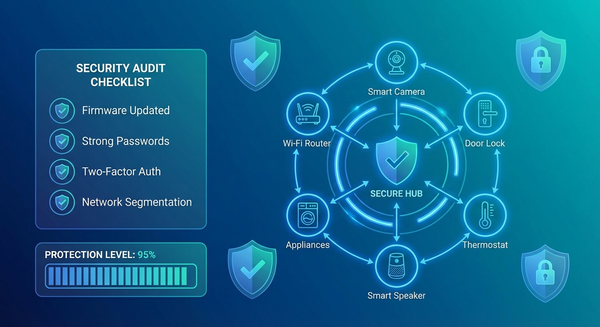
Option 2: Network Segmentation
If you must keep using the device (not recommended):
Create a separate isolated network:
- Use guest Wi-Fi network for IoT devices only
- Block IoT network from accessing main network
- Disable device access to other smart home devices
- Implement strict firewall rules
Router configuration:
- Enable "Client Isolation" or "AP Isolation" for guest network
- Block specific outbound connections to known C2 servers
- Limit bandwidth available to IoT network
- Monitor and log all traffic from IoT devices
Limitations: This reduces risk but doesn't eliminate it. The device can still be used for ad fraud and proxy services.
Prevention: Building a Secure Smart Home From Scratch
Rule #1: Buy Only Certified Devices
Look for official certifications:
Google TV / Android TV Certified:
- Official "Android TV" or "Google TV" logo
- Google Play Store pre-installed
- Listed on Android TV's official partner list
- From major manufacturers: Sony, TCL, Hisense, Philips
Other certifications to trust:
- UL certification (Underwriters Laboratories)
- FCC certification for US market
- CE marking for EU market
- Works with major ecosystems: Apple HomeKit, Amazon Alexa, Google Home
Rule #2: Stick with Reputable Brands
Smart TV manufacturers with strong security track records:
- Samsung
- LG
- Sony
- Vizio
- TCL (certified models)
- Hisense (certified models)
Streaming devices from trusted sources:
- Roku devices (all models)
- Apple TV
- Google Chromecast with Google TV
- Amazon Fire TV (official devices, not third-party clones)
- NVIDIA Shield TV
Avoid:
- Brands you've never heard of
- "Too good to be true" pricing
- Devices with no English-language manufacturer website
- Products with only Chinese-language support
- Rebranded products from unknown distributors
Rule #3: Purchase from Authorized Retailers
Safest purchase locations:
- Directly from manufacturer
- Best Buy, Target, Walmart (retail stores or official online stores)
- Amazon (sold and shipped by Amazon, not third-party sellers)
- Costco, Sam's Club (bulk retailers)
- Official brand stores (Apple Store, Microsoft Store, etc.)
Higher risk:
- Amazon Marketplace third-party sellers
- eBay sellers (especially international)
- AliExpress, Wish, Temu
- Unknown online electronics stores
- Deals "too good to be true"
Rule #4: Verify Before Connecting
When you get a new device:
1. Inspect packaging
- Look for signs of tampering or resealing
- Verify serial numbers match on device and box
- Check for proper regulatory certifications
2. First boot inspection
- Watch the boot sequence—official devices show manufacturer logos
- Verify Google services are pre-installed (if Android device)
- Check if Google Play Store works and updates available
3. Immediate security checks
- Change default passwords immediately
- Enable two-factor authentication if available
- Disable unnecessary features (cameras, microphones if not used)
- Update firmware before connecting to main network
4. Network isolation initially
- Connect to guest network for first 24-48 hours
- Monitor network traffic before allowing on main network
- Verify device behavior before trusting it
Rule #5: Maintain Strong Network Security
Router-level protections:
1. Segment your network
- Main network: Computers, phones, sensitive data
- IoT network: Smart home devices, TVs, streaming boxes
- Guest network: Visitors, untrusted devices
2. Enable firewall rules
- Block incoming connections to IoT devices
- Restrict IoT devices from accessing main network
- Monitor and log all IoT traffic
3. Use strong Wi-Fi security
- WPA3 encryption (or WPA2 if WPA3 unavailable)
- Complex, unique Wi-Fi password
- Hidden SSID (optional additional security)
- Disable WPS (Wi-Fi Protected Setup)
4. Implement DNS filtering
- Use Pi-hole or similar DNS-based ad blocker
- Block known malicious domains
- Monitor query logs for suspicious activity
5. Regular monitoring
- Check router logs weekly
- Review connected devices monthly
- Monitor bandwidth usage for anomalies
- Update router firmware regularly
Rule #6: Stay Informed and Updated
Create a device inventory:
- List all smart home devices
- Track firmware versions
- Note last update dates
- Set calendar reminders for quarterly security checks
Subscribe to security alerts:
- FBI Internet Crime Complaint Center (IC3)
- CISA advisories on IoT security
- Manufacturer security bulletins
- Consumer Reports and security blogs
The Broader Context: Why BadBox 2.0 Matters
The Smart Home Security Crisis
BadBox 2.0 is not an isolated incident—it's a symptom of systemic problems in the IoT industry:
The numbers paint a grim picture:
- 820,000 IoT hacking attempts occur every day (2025 average)
- 46% increase in daily attack volume compared to 2024
- Average home network faces 10 distinct attack attempts every 24 hours
- 1 in 5 IoT devices still uses default passwords
- 60% of IoT breaches happen due to outdated firmware
- 25 vulnerabilities exist on average in every IoT device
- 50%+ of IoT devices have critical vulnerabilities exploitable right now
The Race to the Bottom: Budget Devices and Security Trade-offs
Why budget devices are so vulnerable:
1. Manufacturing cost pressures
- Security testing is expensive
- Certification processes cost money
- Cheap devices skip quality assurance
2. Lack of update infrastructure
- Budget manufacturers don't maintain update servers
- Devices abandoned within months of release
- No resources for security patches
3. Supply chain opacity
- Components from multiple Chinese suppliers
- No visibility into firmware integrity
- Backdoors introduced at various stages
4. Minimal regulatory oversight
- IoT devices largely unregulated for security
- No mandatory security standards for consumer devices
- International supply chains make enforcement difficult
Google's Legal Action and Industry Response
Google's July 2025 lawsuit seeks:
- Injunction against the 25 named Chinese entities
- Seizure of BadBox 2.0 infrastructure
- Damages for harm to Android ecosystem
- Transparency about compromised devices
FBI involvement:
- Internet Crime Complaint Center (IC3) issued public warnings
- Coordinating with Google on botnet takedown
- Investigating US-based victims for criminal use of proxies
Industry implications:
- Increased pressure for IoT security regulations
- Calls for mandatory certification for smart home devices
- Growing awareness of supply chain security risks
- Push for "security by design" in IoT products
What You Should Do Right Now
Immediate Action Checklist
Within the next hour:
- [ ] Make a list of all Android-based smart devices in your home
- [ ] Check each device for Google certification (Play Store presence)
- [ ] Identify budget or off-brand devices purchased from third-party sellers
- [ ] Review your router's connected device list
Within the next 24 hours:
- [ ] Disconnect suspected devices from your network
- [ ] Check for available firmware updates on all smart home devices
- [ ] Change default passwords on all IoT devices (routers, cameras, smart TVs)
- [ ] Enable Google Play Protect on certified Android devices
Within the next week:
- [ ] Research and implement network segmentation (main + IoT networks)
- [ ] Set up DNS filtering (Pi-hole or similar) if technically capable
- [ ] Review purchase history and return policies for recent suspect devices
- [ ] Enable router logging and review traffic patterns
Within the next month:
- [ ] Replace uncertified or suspicious devices with certified alternatives
- [ ] Implement regular security review schedule (monthly device checks)
- [ ] Subscribe to security news sources for IoT/smart home alerts
- [ ] Educate family members about smart home security
Questions to Ask Before Every Smart Home Purchase
Before clicking "buy":
- Is this device from a major, reputable brand?
- Does it have official certifications (Google, Apple, UL, FCC)?
- Is it sold directly by the manufacturer or authorized retailer?
- Does the manufacturer have a track record of security updates?
- Is the price comparable to similar products from major brands?
- Can I find recent reviews from trustworthy sources?
- Does the company have a US/EU presence and support infrastructure?
If you answer "no" to more than two questions, strongly reconsider the purchase.
The Bottom Line: Your Smart Home Is Only As Secure As Its Weakest Device
BadBox 2.0 demonstrates a harsh reality: the convenience of budget smart home devices often comes at the cost of security and privacy.
That $50 smart TV might save you money upfront, but could cost you far more through:
- Compromised home network security
- Personal data exposure
- Legal liability if your IP is used for crimes
- Time and stress dealing with infection
- Replacement costs when device must be discarded
The smart home security hierarchy:
Tier 1: Maximum Security
- Certified devices from major manufacturers only
- Network segmentation in place
- Regular updates and monitoring
- Strong access controls
- Limited device connectivity (only what's necessary)
Tier 2: Moderate Security
- Mix of certified and non-certified devices
- Basic network security (strong passwords, updated firmware)
- Occasional monitoring
- Some network segmentation
Tier 3: High Risk
- Budget devices from unknown brands
- No network segmentation
- Default passwords unchanged
- No monitoring or update schedule
- Purchased from third-party marketplace sellers
Most US smart homes currently sit in Tier 3. The 10 million devices compromised by BadBox 2.0 prove it.
Moving Forward: Building a Secure Smart Home Culture
The smart home revolution promised convenience, efficiency, and futuristic living. BadBox 2.0 reminds us that those benefits require vigilance, informed choices, and security-first thinking.
Key principles for smart home security:
- Trust is earned, not assumed: Every device must prove its security before joining your network
- Price reflects priorities: Extremely cheap devices cut corners, often in security
- Certification matters: Third-party verification provides accountability
- Network segmentation is essential: Assume every IoT device could be compromised
- Updates are not optional: Outdated firmware is low-hanging fruit for attackers
- Default settings are dangerous: Change passwords, disable unnecessary features
- Monitoring catches problems early: Regular checks identify compromises before they escalate
The smart home of the future must be secure by default, not as an afterthought.
Until manufacturers, regulators, and the industry as a whole prioritize security over profits and convenience, the responsibility falls on you to protect your home network.
BadBox 2.0 compromised 10 million devices because users trusted that a device sold on Amazon or at an electronics store would be safe to use. That trust was misplaced.
Don't be device number 10,000,001.
Resources and Further Reading
Official sources:
- Google's BadBox 2.0 Blog Post
- FBI IC3 Public Service Announcement on BadBox
- HUMAN Security's BadBox 2.0 Technical Analysis
Security tools:
- Pi-hole Network-Wide Ad Blocking and DNS Filtering
- Wireshark Network Protocol Analyzer
- GlassWire Network Monitoring Tool
Smart home security guides:
- Consumer Reports Smart Home Security Guide
- CISA IoT Security Recommendations
- NIST Cybersecurity for IoT Program
Stay safe. Stay informed. Stay secure.
Your smart home should work for you, not for a criminal botnet operating out of China.
Have you checked your smart home devices for BadBox 2.0 infection? Share your experience in the comments and help others protect their homes.